


Description
In this engaging beginner level activity, we will use the world of sports to illustrate how to use the AVERAGE function in Excel. Specifically, students build a spreadsheet that calculates averages based on a fictional 10 game cross sample of NBA players scoring stats. Formatting skills are reviewed here as the exercise requires the creation of headings, the formatting of shapes, the use of borders, as well as different font sizes and colors.
This lesson can be used in other versions of Excel and is a classroom tested exercise. I usually give this assignment within the first couple of classes of an Excel unit, after having covered basic data entry and after the students are familiar with basic math functions such as SUM and AutoSum.
Please feel free to contact me with questions or comments regarding this assignment! I hope that you find it useful and I look forward to hearing from you.
Included in this package:
- a .pdf instruction file (not much step by step hand holding in this one)
- a .pdf teacher instruction file (lots of step by step and screenshots. Depending on the class/level this is a good option)
- a sample Excel answer file that includes a tab with a finished answer and another tab that is a good starting point to demo the skills involved in this activity. The demo tab has the data entry completed but none of the formatting or math.
Tips:
- Take the time to do one yourself prior to presenting to the students so you are familiar with the steps.
- I recommend you start by opening the demo tab in the provided Excel file and then present all of the math and formatting.
- After that, students can be given the instructions and off they go!
Others you might like:
Excel 2010 Tutorial - Using Sparklines to graph data trends
Excel 2010 Tutorial - Intro to Excel, data entry and formatting
Excel 2010 Tutorial -Creating a Grocery List using the AutoSum function, formulas
This lesson can be used in other versions of Excel and is a classroom tested exercise. I usually give this assignment within the first couple of classes of an Excel unit, after having covered basic data entry and after the students are familiar with basic math functions such as SUM and AutoSum.
Please feel free to contact me with questions or comments regarding this assignment! I hope that you find it useful and I look forward to hearing from you.
Included in this package:
- a .pdf instruction file (not much step by step hand holding in this one)
- a .pdf teacher instruction file (lots of step by step and screenshots. Depending on the class/level this is a good option)
- a sample Excel answer file that includes a tab with a finished answer and another tab that is a good starting point to demo the skills involved in this activity. The demo tab has the data entry completed but none of the formatting or math.
Tips:
- Take the time to do one yourself prior to presenting to the students so you are familiar with the steps.
- I recommend you start by opening the demo tab in the provided Excel file and then present all of the math and formatting.
- After that, students can be given the instructions and off they go!
Others you might like:
Excel 2010 Tutorial - Using Sparklines to graph data trends
Excel 2010 Tutorial - Intro to Excel, data entry and formatting
Excel 2010 Tutorial -Creating a Grocery List using the AutoSum function, formulas
Report this resource to TPT
Reported resources will be reviewed by our team. Report this resource to let us know if this resource violates TPT's content guidelines.
Highlights
Digital downloads

Grades
7th - 12th

Subjects
Tags
Pages
20
Teaching Duration
90 minutes
Save even more with bundles
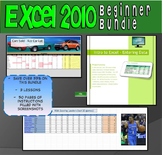
This 3 lesson bundle is aimed at middle school to high school students. It provides engaging, ready to go beginner to intermediate level activities for your students. It is priced to save you over 33% off buying each of the products individually. Note that this will be a growing bundle, so buy n
Price $8.10Original Price $9.00Save $0.90
4
Description
In this engaging beginner level activity, we will use the world of sports to illustrate how to use the AVERAGE function in Excel. Specifically, students build a spreadsheet that calculates averages based on a fictional 10 game cross sample of NBA players scoring stats. Formatting skills are reviewed here as the exercise requires the creation of headings, the formatting of shapes, the use of borders, as well as different font sizes and colors.
This lesson can be used in other versions of Excel and is a classroom tested exercise. I usually give this assignment within the first couple of classes of an Excel unit, after having covered basic data entry and after the students are familiar with basic math functions such as SUM and AutoSum.
Please feel free to contact me with questions or comments regarding this assignment! I hope that you find it useful and I look forward to hearing from you.
Included in this package:
- a .pdf instruction file (not much step by step hand holding in this one)
- a .pdf teacher instruction file (lots of step by step and screenshots. Depending on the class/level this is a good option)
- a sample Excel answer file that includes a tab with a finished answer and another tab that is a good starting point to demo the skills involved in this activity. The demo tab has the data entry completed but none of the formatting or math.
Tips:
- Take the time to do one yourself prior to presenting to the students so you are familiar with the steps.
- I recommend you start by opening the demo tab in the provided Excel file and then present all of the math and formatting.
- After that, students can be given the instructions and off they go!
Others you might like:
Excel 2010 Tutorial - Using Sparklines to graph data trends
Excel 2010 Tutorial - Intro to Excel, data entry and formatting
Excel 2010 Tutorial -Creating a Grocery List using the AutoSum function, formulas
This lesson can be used in other versions of Excel and is a classroom tested exercise. I usually give this assignment within the first couple of classes of an Excel unit, after having covered basic data entry and after the students are familiar with basic math functions such as SUM and AutoSum.
Please feel free to contact me with questions or comments regarding this assignment! I hope that you find it useful and I look forward to hearing from you.
Included in this package:
- a .pdf instruction file (not much step by step hand holding in this one)
- a .pdf teacher instruction file (lots of step by step and screenshots. Depending on the class/level this is a good option)
- a sample Excel answer file that includes a tab with a finished answer and another tab that is a good starting point to demo the skills involved in this activity. The demo tab has the data entry completed but none of the formatting or math.
Tips:
- Take the time to do one yourself prior to presenting to the students so you are familiar with the steps.
- I recommend you start by opening the demo tab in the provided Excel file and then present all of the math and formatting.
- After that, students can be given the instructions and off they go!
Others you might like:
Excel 2010 Tutorial - Using Sparklines to graph data trends
Excel 2010 Tutorial - Intro to Excel, data entry and formatting
Excel 2010 Tutorial -Creating a Grocery List using the AutoSum function, formulas
Report this resource to TPT
Reported resources will be reviewed by our team. Report this resource to let us know if this resource violates TPT's content guidelines.
Reviews
All verified TPT purchases
Thank you

You are welcome!
Thanks
You are welcome
Questions & Answers
Loading
Loading
