


Description
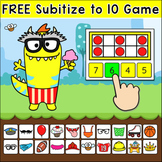
This fun and engaging subitizing to 10 math game works will all interactive whiteboards, tablets and computers. A perfect game to use as a math center, for a whole class collaboration activity or for individual play while distance learning.
Note: An internet connection is required to play this game.
For in-class learning you can:
- use the game as a digital math center
- play whole class on an interactive whiteboard
For distance learning you can:
- assign the game to students to play at home through your LMS. Just include a link to the game in an assignment in Google Classroom, Seesaw or your LMS.
- play as a whole class while screen sharing during your online live instruction. Start the game on your computer, share your screen and then control the game yourself while you call on students to answer questions, or give mouse control to one student at a time to control the game.
- play one-on-one with a student while screen sharing
This game works on many devices including:
- all interactive whiteboards (SMARTBoard, Promethean, Mimio)
- iPads and tablets
- Chromebooks, laptops and personal computers
Customize the Game
The game has several options so you can customize it to your needs:
- Control the difficulty by choosing from 2 to 4 possible answers per question
- Option to make the game self-correcting
- Option to show the correct answer after an incorrect answer is chosen
Game Format:
This game runs directly from the pinkcatgames.com website. The website was created so that you can easily play and manage your Pink Cat Games. The website also allows you to easily save game settings with the option to assign games to students and groups. The first time that you visit the website you will be asked to create an account to manage your games. The following browsers are supported: Chrome, Firefox, Microsoft Edge, and Safari.
How to Play
Whole Class Cooperation - The class works together on the interactive whiteboard to build a monster. Have one student at a time come up to the interactive whiteboard to choose a feature to add to the monster and answer a question. Each game board has 20 body features. After all of the features have been added to the monster, the class will have created a fun and silly monster. Each time you play, the resulting monster will be unique and the questions will randomize so the game is always unique and fun.
Small group or single player – Played on tablets or computer workstations (PC or Mac)
Start the game on a computer or tablet and allow the student(s) to play for a certain length of time.
AMAZING DEAL! With my One Year Digital Games Subscription you will have access to all of the games on the pinkcatgames.com website!
All Digital Games - click here to see all of my games sorted by best seller
All Digital Math Games - click here to see all of my Math Games
All Digital Language Games - click here to see all of my Language Games
Digital Game Types
BTSAct EOYAct pcg dmg ddsbdg bcdgt
Free Subitizing Game using Ten Frames for In-Class and Distance Learning

Highlights


Description
This fun and engaging subitizing to 10 math game works will all interactive whiteboards, tablets and computers. A perfect game to use as a math center, for a whole class collaboration activity or for individual play while distance learning.
Note: An internet connection is required to play this game.
For in-class learning you can:
- use the game as a digital math center
- play whole class on an interactive whiteboard
For distance learning you can:
- assign the game to students to play at home through your LMS. Just include a link to the game in an assignment in Google Classroom, Seesaw or your LMS.
- play as a whole class while screen sharing during your online live instruction. Start the game on your computer, share your screen and then control the game yourself while you call on students to answer questions, or give mouse control to one student at a time to control the game.
- play one-on-one with a student while screen sharing
This game works on many devices including:
- all interactive whiteboards (SMARTBoard, Promethean, Mimio)
- iPads and tablets
- Chromebooks, laptops and personal computers
Customize the Game
The game has several options so you can customize it to your needs:
- Control the difficulty by choosing from 2 to 4 possible answers per question
- Option to make the game self-correcting
- Option to show the correct answer after an incorrect answer is chosen
Game Format:
This game runs directly from the pinkcatgames.com website. The website was created so that you can easily play and manage your Pink Cat Games. The website also allows you to easily save game settings with the option to assign games to students and groups. The first time that you visit the website you will be asked to create an account to manage your games. The following browsers are supported: Chrome, Firefox, Microsoft Edge, and Safari.
How to Play
Whole Class Cooperation - The class works together on the interactive whiteboard to build a monster. Have one student at a time come up to the interactive whiteboard to choose a feature to add to the monster and answer a question. Each game board has 20 body features. After all of the features have been added to the monster, the class will have created a fun and silly monster. Each time you play, the resulting monster will be unique and the questions will randomize so the game is always unique and fun.
Small group or single player – Played on tablets or computer workstations (PC or Mac)
Start the game on a computer or tablet and allow the student(s) to play for a certain length of time.
AMAZING DEAL! With my One Year Digital Games Subscription you will have access to all of the games on the pinkcatgames.com website!
All Digital Games - click here to see all of my games sorted by best seller
All Digital Math Games - click here to see all of my Math Games
All Digital Language Games - click here to see all of my Language Games
Digital Game Types
BTSAct EOYAct pcg dmg ddsbdg bcdgt
