


Description
🎮💥 HTML + JavaScript Game Development Lesson | Grades 6-12 | Middle & High School | JavaScript Games | Bug Blaster Game Development & JavaScript Debugging Adventure🐞🧠
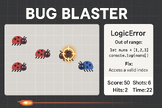
💬 Ready to turn debugging into a blast? Bug Blaster: Debugging Adventure is a classroom-ready, student-friendly HTML5 Canvas game lesson that helps students explore JavaScript errors through interactive gameplay. Students “blast” animated bug sprites representing Syntax, Reference, Type, and Logic errors — and learn how to fix them in real time!
This resource is perfect for teachers who want to teach coding and debugging without needing to be a programming expert. Students analyze a fully built game, explore how animation and collision detection work, and modify small parts of the code to deepen their understanding.
✅ What’s Included
- 🎮 Fully playable HTML5 Canvas game
- 🧾 Complete teacher guide (no coding experience required!)
- 🧠 Student handouts with reflection, lab, and challenge tasks
- 🧪 Annotated code walkthroughs (movement, collision, SVG integration)
- 🗂️ Scope & sequence + pacing guide
- 📊 Editable assessment rubric
- 📽️ Slide deck outline for classroom presentation
- 🔗 Free YouTube video links for visual learners
- 🐞 SVG bug sprites representing real error types
- 💻 Compatible with VS Code, Replit, CodeSandbox, and Chromebooks
🍎 Why It Matters for Teachers
- No need to build a game from scratch — everything is done for you
- Designed for teachers with little to no coding experience
- Flexible for beginners, intermediate, or advanced learners
- Covers real CS concepts: game loops, delta time, collision detection, event listeners
- Includes everything: lesson plan, handouts, rubrics, code examples, and visuals
- Easy to differentiate and scaffold — perfect for mixed-ability classrooms
🎓 Why It Matters for Students
- Makes debugging fun, visual, and interactive
- Builds confidence with real code in a low-stakes environment
- Connects math, logic, and programming in a meaningful way
- Encourages creativity through game modification
- Supports multiple learning styles: visual, kinesthetic, exploratory
- Reinforces vocabulary and error literacy through gameplay
📚 Standards Alignment
CSTA 2-AP-10 Use flowcharts and pseudocode to represent algorithms
CSTA 2-AP-13 Decompose problems into smaller components
CSTA 3A-AP-17 Systematically test and refine programs
ISTE 4a Use a deliberate design process for problem solving
ISTE 5d Understand and apply debugging strategies
NGSS ETS1-2 Evaluate solutions based on criteria and constraints
🧠 What Students Will Learn
- How HTML5 Canvas renders graphics and animation
- How JavaScript uses delta time for smooth movement
- How collision detection works using geometry
- How to identify and fix common JavaScript errors
- How to read and modify real game code
- How debugging is a creative, iterative process
🛍️ Why You Should Buy This Resource
This lesson solves a major pain point for CS teachers: teaching debugging in a way that’s engaging, visual, and accessible. Instead of dry error messages and abstract syntax rules, students get a hands-on, game-based experience that builds real understanding. Whether you’re brand new to coding or a seasoned CS teacher, Bug Blaster gives you everything you need to teach with confidence — and your students will love it.
Make debugging fun. Make coding visual. Make your classroom a blast. 💥🐞🎮
Follow Us and Give Feedback!
Click the ★ to follow my store and get notified when new products and freebies become available. Did you know that you can receive credit toward future TpT purchases by reviewing this product? Each dollar you spend gives you one TpT credit! If you enjoy this product, please leave a positive review at the product page or through "My Purchases" under "My Account" at TpT.
HTML JavaScript Complete Lesson Grades 6-12 Game Development: Bug Blaster

Highlights


Save even more with bundles


Description
🎮💥 HTML + JavaScript Game Development Lesson | Grades 6-12 | Middle & High School | JavaScript Games | Bug Blaster Game Development & JavaScript Debugging Adventure🐞🧠
💬 Ready to turn debugging into a blast? Bug Blaster: Debugging Adventure is a classroom-ready, student-friendly HTML5 Canvas game lesson that helps students explore JavaScript errors through interactive gameplay. Students “blast” animated bug sprites representing Syntax, Reference, Type, and Logic errors — and learn how to fix them in real time!
This resource is perfect for teachers who want to teach coding and debugging without needing to be a programming expert. Students analyze a fully built game, explore how animation and collision detection work, and modify small parts of the code to deepen their understanding.
✅ What’s Included
- 🎮 Fully playable HTML5 Canvas game
- 🧾 Complete teacher guide (no coding experience required!)
- 🧠 Student handouts with reflection, lab, and challenge tasks
- 🧪 Annotated code walkthroughs (movement, collision, SVG integration)
- 🗂️ Scope & sequence + pacing guide
- 📊 Editable assessment rubric
- 📽️ Slide deck outline for classroom presentation
- 🔗 Free YouTube video links for visual learners
- 🐞 SVG bug sprites representing real error types
- 💻 Compatible with VS Code, Replit, CodeSandbox, and Chromebooks
🍎 Why It Matters for Teachers
- No need to build a game from scratch — everything is done for you
- Designed for teachers with little to no coding experience
- Flexible for beginners, intermediate, or advanced learners
- Covers real CS concepts: game loops, delta time, collision detection, event listeners
- Includes everything: lesson plan, handouts, rubrics, code examples, and visuals
- Easy to differentiate and scaffold — perfect for mixed-ability classrooms
🎓 Why It Matters for Students
- Makes debugging fun, visual, and interactive
- Builds confidence with real code in a low-stakes environment
- Connects math, logic, and programming in a meaningful way
- Encourages creativity through game modification
- Supports multiple learning styles: visual, kinesthetic, exploratory
- Reinforces vocabulary and error literacy through gameplay
📚 Standards Alignment
CSTA 2-AP-10 Use flowcharts and pseudocode to represent algorithms
CSTA 2-AP-13 Decompose problems into smaller components
CSTA 3A-AP-17 Systematically test and refine programs
ISTE 4a Use a deliberate design process for problem solving
ISTE 5d Understand and apply debugging strategies
NGSS ETS1-2 Evaluate solutions based on criteria and constraints
🧠 What Students Will Learn
- How HTML5 Canvas renders graphics and animation
- How JavaScript uses delta time for smooth movement
- How collision detection works using geometry
- How to identify and fix common JavaScript errors
- How to read and modify real game code
- How debugging is a creative, iterative process
🛍️ Why You Should Buy This Resource
This lesson solves a major pain point for CS teachers: teaching debugging in a way that’s engaging, visual, and accessible. Instead of dry error messages and abstract syntax rules, students get a hands-on, game-based experience that builds real understanding. Whether you’re brand new to coding or a seasoned CS teacher, Bug Blaster gives you everything you need to teach with confidence — and your students will love it.
Make debugging fun. Make coding visual. Make your classroom a blast. 💥🐞🎮
Follow Us and Give Feedback!
Click the ★ to follow my store and get notified when new products and freebies become available. Did you know that you can receive credit toward future TpT purchases by reviewing this product? Each dollar you spend gives you one TpT credit! If you enjoy this product, please leave a positive review at the product page or through "My Purchases" under "My Account" at TpT.
