


Description
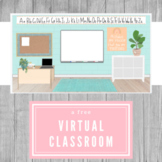
This is a free virtual classroom background to use in your classroom or for distance learning!
This is a Google Slides resource that you can use to create an engaging virtual classroom for your students.
I’ve hand drawn all the items in this classroom so that you can have a unique virtual classroom full of personality!
There are so many ways for you to personalize your virtual classroom!
Each item in the classroom is editable so you can rearrange or delete them.
You can also add “free to re-use” images that you find on Google.
You can add :
- A picture and link to a website on the laptop on the desk.
- Additional posters or banners
- Textbooks, library books, or a dictionary
- Bins, markers or crayons
- Globe or maps
- A class pet or mascot
- Items related to your lesson that day
I recommend doing a Google search for ways to add links to the apps or websites you use to teach (i.e., FlipGrid, Padlet, etc.)
You will receive a copy of this classroom background to use in Google Slides.
You now have a classroom that you can personalize and add links to!
Extra tips on using your virtual classroom:
- If you would like to add items to your classroom:
- Simply go to Google Images, and click Usage Rights.
- On the drop down menu, choose “Labeled for Re-use.”
- The images that you find are free to use in your google classroom.
- If you would like to add a Bitmoji of yourself into your classroom you will need to add the Bitmoji extension onto your device.
- (FYI...Some school districts will not allow you to add this extension to your school computer.
You can add the Bitmoji app to your personal phone, save the Bitmoji poses that you’d
like to use in your phone’s notes app and then save it as a picture.
You can then upload it to your virtual classroom.)
If you have any questions, please reach out to me! :)
I would love your feedback! Please leave a rating/review! Thank you!
I will be adding lots of fun clip-art and resources to my TPT store so feel free to hit the green star to stay updated! :)
Modern Virtual Classroom | Bitmoji | Google Slides | Distance Learning

Highlights


Description
This is a free virtual classroom background to use in your classroom or for distance learning!
This is a Google Slides resource that you can use to create an engaging virtual classroom for your students.
I’ve hand drawn all the items in this classroom so that you can have a unique virtual classroom full of personality!
There are so many ways for you to personalize your virtual classroom!
Each item in the classroom is editable so you can rearrange or delete them.
You can also add “free to re-use” images that you find on Google.
You can add :
- A picture and link to a website on the laptop on the desk.
- Additional posters or banners
- Textbooks, library books, or a dictionary
- Bins, markers or crayons
- Globe or maps
- A class pet or mascot
- Items related to your lesson that day
I recommend doing a Google search for ways to add links to the apps or websites you use to teach (i.e., FlipGrid, Padlet, etc.)
You will receive a copy of this classroom background to use in Google Slides.
You now have a classroom that you can personalize and add links to!
Extra tips on using your virtual classroom:
- If you would like to add items to your classroom:
- Simply go to Google Images, and click Usage Rights.
- On the drop down menu, choose “Labeled for Re-use.”
- The images that you find are free to use in your google classroom.
- If you would like to add a Bitmoji of yourself into your classroom you will need to add the Bitmoji extension onto your device.
- (FYI...Some school districts will not allow you to add this extension to your school computer.
You can add the Bitmoji app to your personal phone, save the Bitmoji poses that you’d
like to use in your phone’s notes app and then save it as a picture.
You can then upload it to your virtual classroom.)
If you have any questions, please reach out to me! :)
I would love your feedback! Please leave a rating/review! Thank you!
I will be adding lots of fun clip-art and resources to my TPT store so feel free to hit the green star to stay updated! :)
