


Description
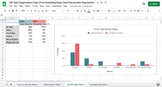
This product is designed to assist you with collecting off-task behavior data (using a time sampling method) and automatically populate a graph that can be added to your psychoeducational assessment. Additionally, it includes an example description that can be added to your psychoeducational report alongside the graph.
This product includes:
- Directions for how to use the tool
- Custom on-/off- task codes
- Data collection sheet that automatically populates percentages that compare target student/peers and different types of off-task behaviors
- Automatically populated graph that visualizes overall on-/off-task behaviors and comparison to peers
- Example description to go along with your graph
To use this tool you, you will:
- Collect observation data on a target student and comparison group directly into the Google sheet
- Use the On-/Off task codes to simplify data collection
- Copy or download the chart to add to your report
- Copy and edit the example narrative to your report
To add the chart to your psychoeducational report, you can:
- Option 1: 1) click "insert" on your google document, 2) hover over "charts" and click "from sheets", 3) then click on the google sheet titled "Off task observation chart...". It will automatically copy the chart to your Google document.
- Option 2: screenshot the chart then insert the screenshot into your document
- Option 3: 1) click on the chart, 2) click the three dots on the upper right hand corner of the chart, 3) click "download", 4) copy the chart and insert into your document
TIP: When you use the “insert from sheets” option, it will give you the option to update when you make changes on the Google sheet.
If you enjoyed this product, please leave a review!
Follow my TpT store to receive notifications of new products, upcoming sales, and my latest freebies!
If you have any questions or suggestions, please leave me a question on this page.
You might also like...
Functional Analysis Screening Tool FAST Graph (Automatic Population) (FREE RESOURCE)
Conners 3 Rating Scales (Short Form) Template
Beck Youth Inventories for Children and Adolescents (BYI-2) Template
Multidimensional Anxiety Scale for Children (MASC-2) Template
Children’s Depression Inventory (CDI-2) Template
Roberts Apperception Test for Children (RATC-2) Template
Editable CHC Cognitive Profile with Bell Curve and Visuals
Editable CHC Cognitive Profile with Bell Curve and Visuals (SPANISH/ENGLISH)
Off Task Observation Data Collection and Automatically Populated Graph

Highlights


Description
This product is designed to assist you with collecting off-task behavior data (using a time sampling method) and automatically populate a graph that can be added to your psychoeducational assessment. Additionally, it includes an example description that can be added to your psychoeducational report alongside the graph.
This product includes:
- Directions for how to use the tool
- Custom on-/off- task codes
- Data collection sheet that automatically populates percentages that compare target student/peers and different types of off-task behaviors
- Automatically populated graph that visualizes overall on-/off-task behaviors and comparison to peers
- Example description to go along with your graph
To use this tool you, you will:
- Collect observation data on a target student and comparison group directly into the Google sheet
- Use the On-/Off task codes to simplify data collection
- Copy or download the chart to add to your report
- Copy and edit the example narrative to your report
To add the chart to your psychoeducational report, you can:
- Option 1: 1) click "insert" on your google document, 2) hover over "charts" and click "from sheets", 3) then click on the google sheet titled "Off task observation chart...". It will automatically copy the chart to your Google document.
- Option 2: screenshot the chart then insert the screenshot into your document
- Option 3: 1) click on the chart, 2) click the three dots on the upper right hand corner of the chart, 3) click "download", 4) copy the chart and insert into your document
TIP: When you use the “insert from sheets” option, it will give you the option to update when you make changes on the Google sheet.
If you enjoyed this product, please leave a review!
Follow my TpT store to receive notifications of new products, upcoming sales, and my latest freebies!
If you have any questions or suggestions, please leave me a question on this page.
You might also like...
Functional Analysis Screening Tool FAST Graph (Automatic Population) (FREE RESOURCE)
Conners 3 Rating Scales (Short Form) Template
Beck Youth Inventories for Children and Adolescents (BYI-2) Template
Multidimensional Anxiety Scale for Children (MASC-2) Template
Children’s Depression Inventory (CDI-2) Template
Roberts Apperception Test for Children (RATC-2) Template
Editable CHC Cognitive Profile with Bell Curve and Visuals
Editable CHC Cognitive Profile with Bell Curve and Visuals (SPANISH/ENGLISH)
