TPT
Total:
$0.00
Ordering and Comparing Decimals Pixel Art Math | 5 Images | Google Sheets
Loading
Ordering and Comparing Decimals Pixel Art Math | 5 Images | Google Sheets
Share

What others say

"My students love working on pixel art. Erintegration's resources are the best! Easy to assign and simple for students to follow."
star
Nicole B.

Description

Comparing decimals mystery pixel art math featuring a shark theme! Have students practice place value by comparing decimals with the < and > signs to AUTO-GENERATE one of 5 pixel art images in Google™ Sheets (or Microsoft Excel™) plus a "secret message."

Low Prep: Just assign the sheet in Google Classroom. Each sheet includes all 5 images; students click the tabs at the bottom to advance to the next pixel image. There are 12 math problems per image to solve.

Differentiated: Includes 4 levels - choose 1 to assign:

  • Comparing Decimals Tenths
  • Comparing Decimals Hundredths
  • Comparing Decimals Tenths & Hundredths
  • Comparing Decimals with Ones, Tenths & Hundredths

Editable: The sheet can be easily edited - just change the problems and answers on the Answer Key sheet - no coding needed!

Self-checking: As students solve the problems in Column A, by typing their answers in Column B, a mystery pixel art image is revealed, piece by piece. Students will know they have typed the correct answer if they see pixels appearing!

You and your students will need Google Drive accounts or access to Microsoft Excel.

~~~~~~~~~~~~~~~~~~~

This SAME set of images is available to purchase in 5 versions:

  • Friends of Ten
  • Expanded Form
  • Rounding to Nearest 10 and 100
  • Comparing Decimals
  • Order of Operation (No Exponents)

~~~~~~~~~~~~~~~~~~~

MORE DIGITAL MAGIC REVEAL PIXEL ART

~~~~~~~~~~~~~~~~~~~

Google and Google Apps are trademarks of Google Inc. © 2015 Google Inc. All rights reserved. Microsoft Excel is a trademark of Microsoft. Erintegration is not affiliated with and has not been authorized, sponsored, or otherwise approved by Google Inc. or Microsoft. By purchasing this resource, you agree not to create derivative resources for commercial sale or for free distribution beyond a single classroom using the formulas and pixel art images provided by Erintegration.

Report this resource to TPT
Reported resources will be reviewed by our team. Report this resource to let us know if this resource violates TPT's content guidelines.

Ordering and Comparing Decimals Pixel Art Math | 5 Images | Google Sheets

Rated 5 out of 5, based on 9 reviews
5.0 (9 ratings)
$4.99

Highlights

Digital downloads
Grades icon
Grades
4th - 5th
Standards icon
Standards
Pages
6 PDF + 4 Google Sheets
Answer Key
Does not apply
Teaching Duration
1 Week

What others say

"My students love working on pixel art. Erintegration's resources are the best! Easy to assign and simple for students to follow."
star
Nicole B.

Save even more with bundles

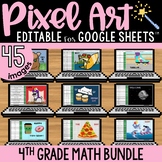
4th grade pixel art math bundle! Practice fourth grade math skills to AUTO-GENERATE one of 5 pixel art images in Google™ Sheets (or Microsoft Excel™) plus a "secret message" in each set.That's a total of 540 self-checking math problems!★ Skills Practiced:• Adding Fractions to Complete the Whole• Ord
Price $35.93Original Price $44.91Save $8.98
9

Description

Comparing decimals mystery pixel art math featuring a shark theme! Have students practice place value by comparing decimals with the < and > signs to AUTO-GENERATE one of 5 pixel art images in Google™ Sheets (or Microsoft Excel™) plus a "secret message."

Low Prep: Just assign the sheet in Google Classroom. Each sheet includes all 5 images; students click the tabs at the bottom to advance to the next pixel image. There are 12 math problems per image to solve.

Differentiated: Includes 4 levels - choose 1 to assign:

  • Comparing Decimals Tenths
  • Comparing Decimals Hundredths
  • Comparing Decimals Tenths & Hundredths
  • Comparing Decimals with Ones, Tenths & Hundredths

Editable: The sheet can be easily edited - just change the problems and answers on the Answer Key sheet - no coding needed!

Self-checking: As students solve the problems in Column A, by typing their answers in Column B, a mystery pixel art image is revealed, piece by piece. Students will know they have typed the correct answer if they see pixels appearing!

You and your students will need Google Drive accounts or access to Microsoft Excel.

~~~~~~~~~~~~~~~~~~~

This SAME set of images is available to purchase in 5 versions:

  • Friends of Ten
  • Expanded Form
  • Rounding to Nearest 10 and 100
  • Comparing Decimals
  • Order of Operation (No Exponents)

~~~~~~~~~~~~~~~~~~~

MORE DIGITAL MAGIC REVEAL PIXEL ART

~~~~~~~~~~~~~~~~~~~

Google and Google Apps are trademarks of Google Inc. © 2015 Google Inc. All rights reserved. Microsoft Excel is a trademark of Microsoft. Erintegration is not affiliated with and has not been authorized, sponsored, or otherwise approved by Google Inc. or Microsoft. By purchasing this resource, you agree not to create derivative resources for commercial sale or for free distribution beyond a single classroom using the formulas and pixel art images provided by Erintegration.

Report this resource to TPT
Reported resources will be reviewed by our team. Report this resource to let us know if this resource violates TPT's content guidelines.

Reviews

5.0
Rated 5 out of 5, based on 9 reviews
9
ratings
All verified TPT purchases
Excellent Resource
Rated 5 out of 5
September 17, 2025
Met expectations
Great value
Standards-aligned
This is an excellent resource that reinforced the skills my students were working on.
Meghan D.
668 reviews • Illinois
Grades taught: 5th
Rated 5 out of 5
January 10, 2025
My students loved this resource! Definitely recommend this purchase.
Jamie G.
1,444 reviews
Grades taught: 4th
Rated 5 out of 5
August 4, 2024
My students love working on pixel art. Erintegration's resources are the best! Easy to assign and simple for students to follow.
Nicole B.
486 reviews
Grades taught: 4th
Rated 5 out of 5
April 18, 2024
This was lots of fun, easy to use, and my students loved it!
Nicole J.
540 reviews
Grades taught: 4th
Rated 5 out of 5
February 14, 2024
Great resource. My students enjoyed completing the task. They enjoyed uncovering the pixel art.
Brian G.
297 reviews
Grades taught: 5th
Rated 5 out of 5
January 15, 2024
This was a fun way to have students self-check their understanding of how to order and compare decimals. I love that there were multiple puzzles as well!
Kelly G.
1,747 reviews
Grades taught: 5th
Rated 5 out of 5
January 1, 2024
love pixel art activities for extra practice on skills
Kristin Anderson
(TPT Seller)
1,000 reviews
Grades taught: 5th
Rated 5 out of 5
August 14, 2022
My students loved this!!
Kerriann H.
57 reviews
Grades taught: 4th
Student populations: Learning difficulties

Questions & Answers

Loading

Standards

to see state-specific standards (only available in the US).
Read, write, and compare decimals to thousandths.
Compare two decimals to thousandths based on meanings of the digits in each place, using >, =, and < symbols to record the results of comparisons.
Use a pair of perpendicular number lines, called axes, to define a coordinate system, with the intersection of the lines (the origin) arranged to coincide with the 0 on each line and a given point in the plane located by using an ordered pair of numbers, called its coordinates. Understand that the first number indicates how far to travel from the origin in the direction of one axis, and the second number indicates how far to travel in the direction of the second axis, with the convention that the names of the two axes and the coordinates correspond (e.g., 𝘹-axis and 𝘹-coordinate, 𝘺-axis and 𝘺-coordinate).
Loading