


Description
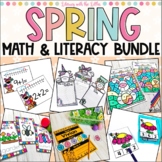
Are you ready for a fun-filled spring bundle to review a bunch of the skills that your students have learned this year? Look no further.
This bundle works on:
-r controlled vowels
-tens and ones
-doubles facts
-measurement
-sight words
-and simple sentences with CVCE words
You need to see how fun they are! Test the preview here.
Save big by getting this deck and tons of other adorable BOOM Decks in the Seasonal BOOM Cards Bundle.
Get tons of BOOM Cards™ at a huge discount by getting a bundle:
⭐ First Grade Boom Cards Mega Bundle
⭐ Little Learners BOOM Card Mega Bundle | Digital Task Cards | Distance Learning ⭐ Seasonal BOOM Cards Bundle | Digital Task Cards for Distance Learning
⭐ Letter Recognition Boom Cards Bundle | Distance Learning | Digital Task Cards ⭐ Counting up to Ten BOOM Cards Bundle | Digital Task Cards | Distance Learning
Why use Boom Cards™?
-Fun!
-Interactive
-Self-checking
-Instant data for the teacher
-Great for at home or at school
(Perfect for distance learning)
To use Boom Cards™ you will need:
-A Boom Learning Account
(accounts range from free to $35 per year depending on your needs)
-A device
(Tablet, computer, or interactive smart board)
-Internet connection
Check out some of my other fun resources:
⭐ Math Centers for Task Boxes Bundle
⭐ Ultimate Short Vowel CVC Bundle
Make sure you are following Literacy with the Littles to get new freebies, updates, and exciting new resources.
More information on Boom Cards:
WHY Boom Cards?
✓ Interactive, engaging and super fun (They feel like a game instead of a worksheet)!
✓ Paperless - no printing, copying, laminating or cutting!
✓ Self-grading - immediate feedback to students and a time saver for you!
✓ Perfect for distance learning
HOW do I use Boom Cards™?
Boom Cards can't be printed. BOOM Cards™ are designed to be played on a device (tablets, smart phones, interactive white boards- pretty much any device with internet access).
To use Boom Cards™, you must be connected to the Internet.
Boom Cards play on modern browsers (Chrome, Safari, Firefox, and Edge). Apps are available for Android, iPads, iPhones, and Kindle Fires.
For security and privacy, adults must have a Boom Learning account to use and assign Boom Cards™. There are different ways to assign BOOM cards™ based on your needs. You can assign them to the entire class or to individual students.
Don't want to make your students log in? You will also be able to assign the Boom Cards you are buying with "Fast Pins," (play provides instant feedback for self-grading Boom Cards™, but fast pins do not provide individual student data to the teacher since using them doesn't require students to log in). Fast Play is always a free way for students to play Boom decks. You do not need a paid account to use fast pins.
For additional assignment options you'll need a premium account. If you are new to Boom Learning, you will be offered a free trial of their premium account. Read here for details: http://bit.ly/BoomTrial.

Highlights


Bonus
Save even more with bundles

Description
Are you ready for a fun-filled spring bundle to review a bunch of the skills that your students have learned this year? Look no further.
This bundle works on:
-r controlled vowels
-tens and ones
-doubles facts
-measurement
-sight words
-and simple sentences with CVCE words
You need to see how fun they are! Test the preview here.
Save big by getting this deck and tons of other adorable BOOM Decks in the Seasonal BOOM Cards Bundle.
Get tons of BOOM Cards™ at a huge discount by getting a bundle:
⭐ First Grade Boom Cards Mega Bundle
⭐ Little Learners BOOM Card Mega Bundle | Digital Task Cards | Distance Learning ⭐ Seasonal BOOM Cards Bundle | Digital Task Cards for Distance Learning
⭐ Letter Recognition Boom Cards Bundle | Distance Learning | Digital Task Cards ⭐ Counting up to Ten BOOM Cards Bundle | Digital Task Cards | Distance Learning
Why use Boom Cards™?
-Fun!
-Interactive
-Self-checking
-Instant data for the teacher
-Great for at home or at school
(Perfect for distance learning)
To use Boom Cards™ you will need:
-A Boom Learning Account
(accounts range from free to $35 per year depending on your needs)
-A device
(Tablet, computer, or interactive smart board)
-Internet connection
Check out some of my other fun resources:
⭐ Math Centers for Task Boxes Bundle
⭐ Ultimate Short Vowel CVC Bundle
Make sure you are following Literacy with the Littles to get new freebies, updates, and exciting new resources.
More information on Boom Cards:
WHY Boom Cards?
✓ Interactive, engaging and super fun (They feel like a game instead of a worksheet)!
✓ Paperless - no printing, copying, laminating or cutting!
✓ Self-grading - immediate feedback to students and a time saver for you!
✓ Perfect for distance learning
HOW do I use Boom Cards™?
Boom Cards can't be printed. BOOM Cards™ are designed to be played on a device (tablets, smart phones, interactive white boards- pretty much any device with internet access).
To use Boom Cards™, you must be connected to the Internet.
Boom Cards play on modern browsers (Chrome, Safari, Firefox, and Edge). Apps are available for Android, iPads, iPhones, and Kindle Fires.
For security and privacy, adults must have a Boom Learning account to use and assign Boom Cards™. There are different ways to assign BOOM cards™ based on your needs. You can assign them to the entire class or to individual students.
Don't want to make your students log in? You will also be able to assign the Boom Cards you are buying with "Fast Pins," (play provides instant feedback for self-grading Boom Cards™, but fast pins do not provide individual student data to the teacher since using them doesn't require students to log in). Fast Play is always a free way for students to play Boom decks. You do not need a paid account to use fast pins.
For additional assignment options you'll need a premium account. If you are new to Boom Learning, you will be offered a free trial of their premium account. Read here for details: http://bit.ly/BoomTrial.
