TPT
Total:
$0.00
Typing Practice with Printable Keyboards - Distance Learning
Share

What others say

"This was a great thing to give my 3rd graders to help them know where to place their fingers and which ones to use as they type. I laminated them to use in the classroom and at home. "
star
Jennifer H.
"This is such a great visual for my students to learn what keys they should be pressing with their fingers on their chromebooks. "
star
tiffany l.

Description

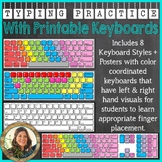
Using printable keyboards is great for students learning to type. I've included several different styles of keyboards that come two to a sheet. You can easily print, laminate, and cut them out.

With this download, I've included 8 different styles of keyboards (all of which are shown in the preview download):

1. Black & White PC Keyboard

2. Color Coordinated PC Keyboard

3. Primary Color Coordinated PC Keyboard

4. Black & White PC Keyboard with 10-Key Number Pad

5. Color Coordinated PC Keyboard with 10-Key Number Pad

6. Black & White Mac Keyboard

7. Color Coordinated Mac Keyboard

8. Primary Color Coordinated Mac Keyboard

* I've also included separate posters with the color coordinated keyboards and left and right hand visuals for students to learn appropriate finger placement.

Some suggestions for use:

- Use in your centers for students to “type” their spelling and/or sight words. Not only will this help them with their words, but with keyboarding as well!

- Early finishers, or students that need extra keyboarding practice, can take one out and practice “typing” right at their desk/table.

- Print them out and post near classroom or lab computers as a reference poster.

- Place in students’ binders/folders as a reference guide, or for extra practice.

Enjoy!

~Tanya Rae Teaches

Report this resource to TPT
Reported resources will be reviewed by our team. Report this resource to let us know if this resource violates TPT's content guidelines.

Typing Practice with Printable Keyboards - Distance Learning

Tanya Rae Teaches
3.1k Followers
$3.00

What others say

"This was a great thing to give my 3rd graders to help them know where to place their fingers and which ones to use as they type. I laminated them to use in the classroom and at home. "
star
Jennifer H.
"This is such a great visual for my students to learn what keys they should be pressing with their fingers on their chromebooks. "
star
tiffany l.

Description

Using printable keyboards is great for students learning to type. I've included several different styles of keyboards that come two to a sheet. You can easily print, laminate, and cut them out.

With this download, I've included 8 different styles of keyboards (all of which are shown in the preview download):

1. Black & White PC Keyboard

2. Color Coordinated PC Keyboard

3. Primary Color Coordinated PC Keyboard

4. Black & White PC Keyboard with 10-Key Number Pad

5. Color Coordinated PC Keyboard with 10-Key Number Pad

6. Black & White Mac Keyboard

7. Color Coordinated Mac Keyboard

8. Primary Color Coordinated Mac Keyboard

* I've also included separate posters with the color coordinated keyboards and left and right hand visuals for students to learn appropriate finger placement.

Some suggestions for use:

- Use in your centers for students to “type” their spelling and/or sight words. Not only will this help them with their words, but with keyboarding as well!

- Early finishers, or students that need extra keyboarding practice, can take one out and practice “typing” right at their desk/table.

- Print them out and post near classroom or lab computers as a reference poster.

- Place in students’ binders/folders as a reference guide, or for extra practice.

Enjoy!

~Tanya Rae Teaches

Report this resource to TPT
Reported resources will be reviewed by our team. Report this resource to let us know if this resource violates TPT's content guidelines.

Reviews

4.8
Rated 4.82 out of 5, based on 364 reviews
364
ratings
5
338
4
22
3
4
2
0
1
0
Grades used with
Reviews
3
12
14
15
9
9
4
K
1st
2nd
3rd
4th
5th
6th
All verified TPT purchases
Easy to Use
Rated 5 out of 5
January 15, 2026
Met expectations
Great value
This was a great thing to give my 3rd graders to help them know where to place their fingers and which ones to use as they type. I laminated them to use in the classroom and at home.
Jennifer H.
445 reviews • California
Grades taught: 3rd
Student populations: Emerging bilinguals
Perfect for beginners
Rated 5 out of 5
October 22, 2025
Met expectations
Great value
Great resource for our young students as we begin learning keyboarding
Megan M.
24 reviews
Grades taught: PreK, K
a well crafted resource
Rated 5 out of 5
September 22, 2025
Students loved the printable keyboards. It made learning placement much easier.
Amanda S.
272 reviews • North Carolina
Grades taught: K
Student populations: Emerging bilinguals, Learning difficulties, Mild to severe disabilities
Awesome Visual!
Rated 5 out of 5
August 30, 2025
Met expectations
Great value
This is such a great visual for my students to learn what keys they should be pressing with their fingers on their chromebooks.
tiffany L.
9 reviews
Grades taught: 3rd
Great Resource!
Rated 5 out of 5
July 30, 2025
Great Resource! This was a great resource! My students enjoyed the activity!
Mary Grace A.
131 reviews
Rated 5 out of 5
July 14, 2025
Very useful tool to use to teach elementary students proper keyboarding skills.
Tabatha Q.
80 reviews
Grades taught: 1st, 2nd, 3rd, 4th, 5th
Rated 5 out of 5
July 13, 2025
This is a great product to help students maintain proper keyboard hand positions. I have copied and laminated these to aid students during our typing practice work, they have been a terrific help.
Catherine C.
388 reviews
Grades taught: 5th
Rated 4 out of 5
April 17, 2025
This is a go-to activity that students love year after year
skye lynch
(TPT Seller)
189 reviews
Grades taught: 5th
Student populations: Mild to severe disabilities

Questions & Answers

Loading
Loading