


Description
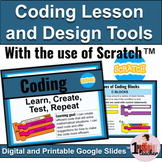
New to coding? This math coding lesson and design tool kit has everything that you need to teach your students about the power of code and the materials to scaffold their use of the coding app Scratch™. Learn, create, test, repeat: Help students build on their use of the math processes for problem-solving with coding.
Online? In-person? Hybrid? No matter what comes your way this year, you will be ready to go with this digital and printable Google Slide™ resource.
Created for the Grade 6 New Ontario Math Curriculum, but can be used wherever this concept is taught! Looking for more Grade 6 resources? Check out my entire collection of Grade 6 Lesson and Differentiated Activities Sets.
Lesson Portion (Digital and Printable)
Guide your students through learning with this lesson with digital transitions for step-by-step learning:
- What is coding?
- Coding vocabulary
- Understanding the language of code
- Types of coding blocks and their uses
- Hat blocks (event and control blocks)
- Stack blocks (motion, looks, sound, events, control, sensing, variable,
and list)
- Boolean blocks
- C blocks (if then, if then else)
- Reporter blocks
- Cap blocks
- What is debugging?
- Writing code using the Scientific Method
- Relating code to the Mathematical Processes
Practice Portion: 2 practice coding activities
Level 1: Play and explore
- Assignment expectations using the math processes
- Exploring coding project ideas
- Peer and teacher feedback form
- Opportunity to communicate with coding vocabulary
Level 2: Apply to create
- Assignment expectations using the math processes
- Exploring coding project ideas
- Planning page using the scientific method
- Peer and teacher feedback form
- Opportunity to communicate with coding vocabulary
Assessment Activity: Application of skills in order to solve math problems with code
Level 3: Digging Deeper
- Assignment expectations using the math processes
- Exploring coding project ideas
- Planning page using the scientific method
- Peer and teacher feedback form
- Opportunity to communicate with coding vocabulary
ALSO INCLUDED
- A single-point rubric for embedded teacher feedback for final evaluation
- Teacher ideas for use, printing (if desired), and sending digitally
- Plus a link and instructions for creating a scratch account if needed
RELATED PRODUCTS
- Beginning of the year number sense diagnostic.
- Emoji math mindset survey
- FULL YEAR Grade 6 math bundle (34% off - Great for saving time and money!)
- FREE math bundle sample! (Rounding Decimals lesson and differentiated activity set)
----------------------------------------------------------
Are you looking for a Microsoft version of this product?
NO PROBLEM! As long as you have a personal Google Drive, you can still use this product for your classroom, with all of the text, images, and interactive transitions intact, making it a valuable tool for your students’ learning no matter which virtual learning platform you are using.
- During the purchase process, allow TpT to add this product to your personal Google Drive
- Open the Google file
- Click on “File” in the top left corner
- Click on “Download”
- Click on the “Microsoft” product that is listed (Mircosoft Word = Google Docs, Powerpoint = Google Slides, Microsoft Excel = Google Sheets)
The new file will download to your computer, and be able to be added to whichever virtual learning environment you are using.
Having trouble? Email me at 1passionateteacher@gmail.com with your order number and I will send you the Microsoft file directly to your email.
----------------------------------------------------------
Did you know that leaving feedback gives you points towards FREE TpT products? Free products for you, feedback for me...it's a win-win!
Please let me know if you have any questions and don't forget to follow me to be notified when more products like these become available! You can also check out my other digital products in my TpT store!
Thank you for your time,
Stacey - 1 Passionate Teacher
Coding | New Ontario Math Curriculum | Lesson and Design Tools Using Scratch™

Highlights


Save even more with bundles


Description
New to coding? This math coding lesson and design tool kit has everything that you need to teach your students about the power of code and the materials to scaffold their use of the coding app Scratch™. Learn, create, test, repeat: Help students build on their use of the math processes for problem-solving with coding.
Online? In-person? Hybrid? No matter what comes your way this year, you will be ready to go with this digital and printable Google Slide™ resource.
Created for the Grade 6 New Ontario Math Curriculum, but can be used wherever this concept is taught! Looking for more Grade 6 resources? Check out my entire collection of Grade 6 Lesson and Differentiated Activities Sets.
Lesson Portion (Digital and Printable)
Guide your students through learning with this lesson with digital transitions for step-by-step learning:
- What is coding?
- Coding vocabulary
- Understanding the language of code
- Types of coding blocks and their uses
- Hat blocks (event and control blocks)
- Stack blocks (motion, looks, sound, events, control, sensing, variable,
and list)
- Boolean blocks
- C blocks (if then, if then else)
- Reporter blocks
- Cap blocks
- What is debugging?
- Writing code using the Scientific Method
- Relating code to the Mathematical Processes
Practice Portion: 2 practice coding activities
Level 1: Play and explore
- Assignment expectations using the math processes
- Exploring coding project ideas
- Peer and teacher feedback form
- Opportunity to communicate with coding vocabulary
Level 2: Apply to create
- Assignment expectations using the math processes
- Exploring coding project ideas
- Planning page using the scientific method
- Peer and teacher feedback form
- Opportunity to communicate with coding vocabulary
Assessment Activity: Application of skills in order to solve math problems with code
Level 3: Digging Deeper
- Assignment expectations using the math processes
- Exploring coding project ideas
- Planning page using the scientific method
- Peer and teacher feedback form
- Opportunity to communicate with coding vocabulary
ALSO INCLUDED
- A single-point rubric for embedded teacher feedback for final evaluation
- Teacher ideas for use, printing (if desired), and sending digitally
- Plus a link and instructions for creating a scratch account if needed
RELATED PRODUCTS
- Beginning of the year number sense diagnostic.
- Emoji math mindset survey
- FULL YEAR Grade 6 math bundle (34% off - Great for saving time and money!)
- FREE math bundle sample! (Rounding Decimals lesson and differentiated activity set)
----------------------------------------------------------
Are you looking for a Microsoft version of this product?
NO PROBLEM! As long as you have a personal Google Drive, you can still use this product for your classroom, with all of the text, images, and interactive transitions intact, making it a valuable tool for your students’ learning no matter which virtual learning platform you are using.
- During the purchase process, allow TpT to add this product to your personal Google Drive
- Open the Google file
- Click on “File” in the top left corner
- Click on “Download”
- Click on the “Microsoft” product that is listed (Mircosoft Word = Google Docs, Powerpoint = Google Slides, Microsoft Excel = Google Sheets)
The new file will download to your computer, and be able to be added to whichever virtual learning environment you are using.
Having trouble? Email me at 1passionateteacher@gmail.com with your order number and I will send you the Microsoft file directly to your email.
----------------------------------------------------------
Did you know that leaving feedback gives you points towards FREE TpT products? Free products for you, feedback for me...it's a win-win!
Please let me know if you have any questions and don't forget to follow me to be notified when more products like these become available! You can also check out my other digital products in my TpT store!
Thank you for your time,
Stacey - 1 Passionate Teacher
Reviews
