


Description
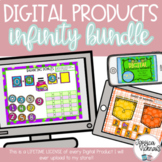
With this DIGITAL interactive notebook, students practice working with math shortcuts such as doubles and doubles plus 1. Students will mentally add and subtract 10 and 20 as well as work with number bonds to make a 10. Also, students will practice basic computer skills like drag and drop as well as simple typing in text boxes.
***Also includes a Boom™ Cards deck and link to pre-loaded activities on Seesaw™!
All a teacher needs to do is share the link via Google™ Classroom or other Learning Management System (LMS). Simply sign in to your Google™ account and click the link to make a copy to your Google Drive. This product is also included as a Microsoft® PowerPoint file and can be uploaded to Microsoft® Teams.
Don't have Google or Microsoft access for your students? No problem! I've included the entire notebook on both Boom Learning AND Seesaw! Just click the links in the PDF to access your copies.
The activities included are:
- Mentally add 10 and 20
- Mentally subtract 10 and 20
- Doubles
- Doubles Plus One
- Double Plus two
- Make a 10 with Number Bonds (9 + 1)
- Make a 10 with Number Bonds (8 + 2)
This product is digital and you will need a device such as a smartphone or a computer, Internet access, and a free Google ™ account or a Microsoft ® Office account. After you purchase, you will be prompted to download your notebook files. When you download, you will receive a zip file containing:
⭐ a PDF file with a link to the Google Slides digital copy, the Seesaw version, and the Boom Cards.
⭐ a PowerPoint copy
⭐ an answer key file containing PNGs of the finished slides
⭐ a guide on using Digital Products in the classroom. This digital guide will help you to understand how to send out the file to your students.
I've also included simple how to videos to show you how students play the notebook, as well as how you can make copies of single slides to send out to your students so they don't feel overwhelmed with the full deck at once!
Read all about a similar product HERE on my blog. You can also grab a FREE example of a digital interactive notebook here.
Thanks and happy teaching!!
Jessica
Visit the Tech and Teachability blog for freebies and project ideas.
Like Tech and Teachability on Facebook
Follow me on Twitter!
Follow me on Instagram!
***********************************WHAT ARE BOOM CARDS?**************************************
Boom Cards are self-grading, DIGITAL resources. To use Boom Cards, you must be connected to the Internet. Boom Cards play on modern browsers (Chrome, Safari, Firefox, and Edge). Apps are available for Android, iPads, iPhones, and Kindle Fires. For security and privacy, adults must have a Boom Learning account to use and assign Boom Cards. You will be able to assign the Boom Cards you are buying with "Fast Pins," (play provides instant feedback for self-grading Boom Cards). Fast Play is always a free way for students to engage with Boom Cards decks. For additional assignment options you'll need a premium account. If you are new to Boom Learning, you will be offered a free trial of our premium account. Readhere for details: http://bit.ly/BoomTrial.
Boom Learning℠ also has premium accounts that offer assignment tools, class performance tracking, and much more. If you are a new Boom Learning customer, when you redeem your Boom Cards purchase you get 90-day free trial of a premium account. Read here for details: http://bit.ly/BoomTrial. When your trial ends, you can renew or move to a free account. You may upgrade, downgrade or cancel at any time. Free accounts use purchased Boom Cards with Fast Play pins (which give instant feedback for decks that are self-grading).
*Boom Learning and Boom Cards are the trademarks of Boom Learning Inc. Used with permission.
*************************************************************************************************************

Highlights


Save even more with bundles

Description
With this DIGITAL interactive notebook, students practice working with math shortcuts such as doubles and doubles plus 1. Students will mentally add and subtract 10 and 20 as well as work with number bonds to make a 10. Also, students will practice basic computer skills like drag and drop as well as simple typing in text boxes.
***Also includes a Boom™ Cards deck and link to pre-loaded activities on Seesaw™!
All a teacher needs to do is share the link via Google™ Classroom or other Learning Management System (LMS). Simply sign in to your Google™ account and click the link to make a copy to your Google Drive. This product is also included as a Microsoft® PowerPoint file and can be uploaded to Microsoft® Teams.
Don't have Google or Microsoft access for your students? No problem! I've included the entire notebook on both Boom Learning AND Seesaw! Just click the links in the PDF to access your copies.
The activities included are:
- Mentally add 10 and 20
- Mentally subtract 10 and 20
- Doubles
- Doubles Plus One
- Double Plus two
- Make a 10 with Number Bonds (9 + 1)
- Make a 10 with Number Bonds (8 + 2)
This product is digital and you will need a device such as a smartphone or a computer, Internet access, and a free Google ™ account or a Microsoft ® Office account. After you purchase, you will be prompted to download your notebook files. When you download, you will receive a zip file containing:
⭐ a PDF file with a link to the Google Slides digital copy, the Seesaw version, and the Boom Cards.
⭐ a PowerPoint copy
⭐ an answer key file containing PNGs of the finished slides
⭐ a guide on using Digital Products in the classroom. This digital guide will help you to understand how to send out the file to your students.
I've also included simple how to videos to show you how students play the notebook, as well as how you can make copies of single slides to send out to your students so they don't feel overwhelmed with the full deck at once!
Read all about a similar product HERE on my blog. You can also grab a FREE example of a digital interactive notebook here.
Thanks and happy teaching!!
Jessica
Visit the Tech and Teachability blog for freebies and project ideas.
Like Tech and Teachability on Facebook
Follow me on Twitter!
Follow me on Instagram!
***********************************WHAT ARE BOOM CARDS?**************************************
Boom Cards are self-grading, DIGITAL resources. To use Boom Cards, you must be connected to the Internet. Boom Cards play on modern browsers (Chrome, Safari, Firefox, and Edge). Apps are available for Android, iPads, iPhones, and Kindle Fires. For security and privacy, adults must have a Boom Learning account to use and assign Boom Cards. You will be able to assign the Boom Cards you are buying with "Fast Pins," (play provides instant feedback for self-grading Boom Cards). Fast Play is always a free way for students to engage with Boom Cards decks. For additional assignment options you'll need a premium account. If you are new to Boom Learning, you will be offered a free trial of our premium account. Readhere for details: http://bit.ly/BoomTrial.
Boom Learning℠ also has premium accounts that offer assignment tools, class performance tracking, and much more. If you are a new Boom Learning customer, when you redeem your Boom Cards purchase you get 90-day free trial of a premium account. Read here for details: http://bit.ly/BoomTrial. When your trial ends, you can renew or move to a free account. You may upgrade, downgrade or cancel at any time. Free accounts use purchased Boom Cards with Fast Play pins (which give instant feedback for decks that are self-grading).
*Boom Learning and Boom Cards are the trademarks of Boom Learning Inc. Used with permission.
*************************************************************************************************************
