TPT
Total:
$0.00
GRAPHING Interactive Mini-Unit (Digital Learning) {Google Slides/Classroom™}
Share

What others say

"This resource is my favorite to use during the graphing unit with my kindergarten students. It explains thing very well and gives lots of opportunities for practice."
star
Sylvia S.
"This is an excellent, time-saving resource! The content was engaging and required minimal prep work, making it perfect for a busy week."
star
Nicole S.

Description

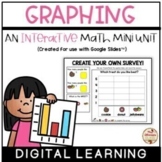
This is a math mini unit which includes a variety of interactive activities that focus on graphing. They are all digital and perfect to use during distance/emergency remote learning. This pack is a Google Slides™ resource that can support your students with distance learning classrooms (i.e. Google Classroom™).

The following is included:

- instruction/definition slides (i.e. What is a Graph?, Parts of a Graph, etc.)

- surveys -> instruction/definition slide, analyze, build, create your own (9 slides)

- bar graphs -> instruction/definition slide, analyze, build, create your own (12 slides)

- Gumball Graphing -> analyze, build, create your own

- Let's Graph -> variety of graphs to build and analyze

- Roll and Graph -> roll a dot die 10 times, graph your results

*Please download the PREVIEW to see all that's included*

What do students have to do? (You can delete the slides you do not wish to use)

  • read instruction/definition slide
  • complete interactive activities

TIP: I like to make additional copies of this product, delete the slides I do not want (perhaps to focus only on one section at a time or to eliminate easy/difficult slides), and share with my class digitally.

How to implement this assignment via Google Classroom™ to your students ->

· simply make a copy of the Google Slides™ link found in this resource and save the link on your Google Drive™ (remember what you call it!)

· share the file with your students (be sure to change sharing to "make a copy for each student")

*These slides are not self correcting but instead can be turned in as an assignment to be checked by the teacher.*

***Please remember that your purchase of this product is for SINGLE USE ONLY (one classroom). Please purchase additional licenses to share with other educators/team members.***

You might like these products!

Bundles

Math

Literacy

Ontario Full Day Kindergarten (FDK) Guide

Come and visit me!

Mrs. Albanese’s Kindergarten Class

Facebook

Instagram

Pinterest

Report this resource to TPT
Reported resources will be reviewed by our team. Report this resource to let us know if this resource violates TPT's content guidelines.

GRAPHING Interactive Mini-Unit (Digital Learning) {Google Slides/Classroom™}

Alessia Albanese
12.7k Followers
$5.00

Highlights

What others say

"This resource is my favorite to use during the graphing unit with my kindergarten students. It explains thing very well and gives lots of opportunities for practice."
star
Sylvia S.
"This is an excellent, time-saving resource! The content was engaging and required minimal prep work, making it perfect for a busy week."
star
Nicole S.

Save even more with bundles

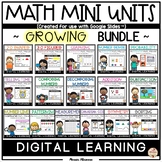
This is a GROWING BUNDLE of interactive math mini units which includes a variety of activities. They are all digital and perfect to use during distance/emergency remote learning. This pack is a Google Slides™ resource that can support your students with distance learning classrooms (i.e. Google Cla
Price $69.20Original Price $86.50Save $17.30
17

Description

This is a math mini unit which includes a variety of interactive activities that focus on graphing. They are all digital and perfect to use during distance/emergency remote learning. This pack is a Google Slides™ resource that can support your students with distance learning classrooms (i.e. Google Classroom™).

The following is included:

- instruction/definition slides (i.e. What is a Graph?, Parts of a Graph, etc.)

- surveys -> instruction/definition slide, analyze, build, create your own (9 slides)

- bar graphs -> instruction/definition slide, analyze, build, create your own (12 slides)

- Gumball Graphing -> analyze, build, create your own

- Let's Graph -> variety of graphs to build and analyze

- Roll and Graph -> roll a dot die 10 times, graph your results

*Please download the PREVIEW to see all that's included*

What do students have to do? (You can delete the slides you do not wish to use)

  • read instruction/definition slide
  • complete interactive activities

TIP: I like to make additional copies of this product, delete the slides I do not want (perhaps to focus only on one section at a time or to eliminate easy/difficult slides), and share with my class digitally.

How to implement this assignment via Google Classroom™ to your students ->

· simply make a copy of the Google Slides™ link found in this resource and save the link on your Google Drive™ (remember what you call it!)

· share the file with your students (be sure to change sharing to "make a copy for each student")

*These slides are not self correcting but instead can be turned in as an assignment to be checked by the teacher.*

***Please remember that your purchase of this product is for SINGLE USE ONLY (one classroom). Please purchase additional licenses to share with other educators/team members.***

You might like these products!

Bundles

Math

Literacy

Ontario Full Day Kindergarten (FDK) Guide

Come and visit me!

Mrs. Albanese’s Kindergarten Class

Facebook

Instagram

Pinterest

Report this resource to TPT
Reported resources will be reviewed by our team. Report this resource to let us know if this resource violates TPT's content guidelines.

Reviews

4.9
Rated 4.87 out of 5, based on 83 reviews
83
ratings
5
72
4
11
3
0
2
0
1
0
Mostly used with Kindergarten
Reviews
1
7
51
24
5
2
1
Early Childhood
PreK
K
1st
2nd
3rd
4th
All verified TPT purchases
I love this resource!!
Rated 5 out of 5
April 19, 2026
Met expectations
Great value
This resource is my favorite to use during the graphing unit with my kindergarten students. It explains thing very well and gives lots of opportunities for practice.
Teachnum
(TPT Seller)
20 reviews • Virginia
Grades taught: PreK, K, 1st
A well crafted resource
Rated 5 out of 5
November 18, 2025
Met expectations
Great value
This is an excellent, time-saving resource! The content was engaging and required minimal prep work, making it perfect for a busy week.
Nicole S.
96 reviews • Outside the United States
Grades taught: K, 1st
Loved this resource
Rated 5 out of 5
August 15, 2025
Met expectations
Great value
This was a great mini unit for graphing. It was interactive and the students were very engaged in the lessons.
Christina L.
454 reviews • Outside the United States
Grades taught: PreK, K
Student populations: Autism, Learning difficulties
Interactive and engaging!
Rated 5 out of 5
August 11, 2025
Met expectations
Great value
When teaching data management in kindergarten this resource is extremely helpful and engaging for the students. Highly recommend it!
Rose M.
9 reviews • Outside the United States
Grades taught: K
Student populations: Autism, Learning difficulties, Mild to severe disabilities
Rated 5 out of 5
July 17, 2025
This is a great resource that helped extend our learning in an engaging way.
Kelsey B.
364 reviews
Grades taught: K
Rated 5 out of 5
June 10, 2025
This resource is very use friendly and kept my students engaged.
Chequita W.
130 reviews
Grades taught: 1st
Rated 5 out of 5
June 7, 2025
This is a great resource! My kids loved doing it.
Michelle E.
1,160 reviews
Grades taught: 1st, 2nd
Student populations: Learning difficulties
Rated 4 out of 5
June 6, 2025
Easy to use and engaging. My students like using this to vote for activities in the classroom.
355 reviews
Grades taught: 3rd

Questions & Answers

Loading
Loading