


Description
Included:
- editable docx
- printable PDF
- .aia files for coding
- .APK for teachers
📱 MIT App Inventor – Mobile App Development (Grades 6–10)👨🎓 1. Student Workbook
🎯 Purpose
Guide students through building a fully functional Android app while learning core programming concepts in a visual, step-by-step way.
🧩 Structure & Workflow
6 project-based lessons → progression from simple interface to complete interactive game → students design UI, apply formatting, add logic (variables + conditions), implement timers and scoring, optimize with procedures, and enhance with sound/media.
🛠️ Components Used
Screen, Label, Button, Horizontal Arrangement, Clock, Player, Sound → covering both visible and non-visible elements.
✨ Key Features
Highly visual instructions with screenshots, student-friendly layout, ready-made base structures → allows focus on programming concepts or guided app building.
🎮 Final Product
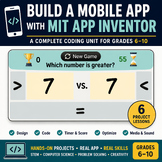
An interactive Android game where users compare two numbers and choose >, <, = , suitable for coding, STEM, and math practice.
👩🏫 2. Teacher Lesson Guides
📋 Overview
6 complete, ready-to-use lesson plans → easy classroom implementation for full units or shorter projects.
🧠 Lesson Content
Clear objectives + timelines + guided practice + hands-on tasks + assessment ideas + answer keys + differentiation strategies.
💻 Topics Covered
UI design, component management, formatting, variables, conditional logic (if-then-else), timers, scoring systems, procedures (modular coding).
🎯 Flexibility
Can be used as a full coding curriculum or as a guided project → beginner-friendly with strong visual support.
📝 3. Extra Student Practice 📌 Purpose
Reinforce concepts, deepen understanding, support retention of programming logic and app functionality.
📚 Activities
Worksheets aligned with all 6 projects → covering UI, formatting, variables, logic, algorithms, timers, scoring, procedures.
🧠 Task Types
Matching, true/false, sequencing algorithms, short answers, reflection prompts → encourages critical thinking about app logic.
🎯 Usage
Ideal for differentiation, homework, early finishers, or review sessions → can also be used independently for math-focused lessons.
Summary
A complete, visual, and structured learning package combining coding + app development + math practice → students build their own app while teachers get ready-to-use materials → engaging, flexible, and beginner-friendly.
Project-Based Coding Unit | Build an Android App with MIT App Inventor | Numbers

Highlights


Save even more with bundles
Description
Included:
- editable docx
- printable PDF
- .aia files for coding
- .APK for teachers
📱 MIT App Inventor – Mobile App Development (Grades 6–10)👨🎓 1. Student Workbook
🎯 Purpose
Guide students through building a fully functional Android app while learning core programming concepts in a visual, step-by-step way.
🧩 Structure & Workflow
6 project-based lessons → progression from simple interface to complete interactive game → students design UI, apply formatting, add logic (variables + conditions), implement timers and scoring, optimize with procedures, and enhance with sound/media.
🛠️ Components Used
Screen, Label, Button, Horizontal Arrangement, Clock, Player, Sound → covering both visible and non-visible elements.
✨ Key Features
Highly visual instructions with screenshots, student-friendly layout, ready-made base structures → allows focus on programming concepts or guided app building.
🎮 Final Product
An interactive Android game where users compare two numbers and choose >, <, = , suitable for coding, STEM, and math practice.
👩🏫 2. Teacher Lesson Guides
📋 Overview
6 complete, ready-to-use lesson plans → easy classroom implementation for full units or shorter projects.
🧠 Lesson Content
Clear objectives + timelines + guided practice + hands-on tasks + assessment ideas + answer keys + differentiation strategies.
💻 Topics Covered
UI design, component management, formatting, variables, conditional logic (if-then-else), timers, scoring systems, procedures (modular coding).
🎯 Flexibility
Can be used as a full coding curriculum or as a guided project → beginner-friendly with strong visual support.
📝 3. Extra Student Practice 📌 Purpose
Reinforce concepts, deepen understanding, support retention of programming logic and app functionality.
📚 Activities
Worksheets aligned with all 6 projects → covering UI, formatting, variables, logic, algorithms, timers, scoring, procedures.
🧠 Task Types
Matching, true/false, sequencing algorithms, short answers, reflection prompts → encourages critical thinking about app logic.
🎯 Usage
Ideal for differentiation, homework, early finishers, or review sessions → can also be used independently for math-focused lessons.
Summary
A complete, visual, and structured learning package combining coding + app development + math practice → students build their own app while teachers get ready-to-use materials → engaging, flexible, and beginner-friendly.
