


Description
"Don't look at your hands," we were told in business typing classes. "Keep your eyes on copy." That was fine in high school and junior high, but now we see core curriculum requiring that third grade students being introduced to computer keyboards. How age appropriate is touch typing based on Piaget's developmental theory? It's not.
Teaching Language Arts with Eyes on Keyboards
For too many years computer keyboarding has been taught with cardboard boxes cut up to cover the fingers on letter keys in computer labs. Students have been sitting in one size fits all computer labs where their feet don’t touch the ground and are often seen kicking the wires.
PreKeys is developmentally appropriate for young learners, starting with students standing or hopping on a giant, unplugged vinyl mat with QWERTY style patterns of numbers and letters. They first learn to recognize the shapes of letters, then learn to locate those letters in alphabetical order amidst the Alphabet Soup made by the order of letters on keyboards.
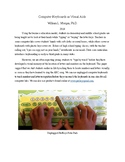
When moving to the table top, PreKeys Pals learn which letters are found in each column with number keys as their guides. These students learn to read the computer keyboards from top to bottom and from left to right. Prior to third grade, in their classrooms with tables and chairs that fit their bodies, PreKeys Pals learn to form L shapes with their elbows. They learn to curve their fingers so that fingertips line up in rows. They treat each row of numbers and letters as separate home rows.
The songs and stories led by parents, grandparents, teachers, teaching assistants, classroom volunteers, caregivers, (add yourself to the list) are engaging. We encourage creation of videos for adults to play back for the student actors.

Highlights


Description
"Don't look at your hands," we were told in business typing classes. "Keep your eyes on copy." That was fine in high school and junior high, but now we see core curriculum requiring that third grade students being introduced to computer keyboards. How age appropriate is touch typing based on Piaget's developmental theory? It's not.
Teaching Language Arts with Eyes on Keyboards
For too many years computer keyboarding has been taught with cardboard boxes cut up to cover the fingers on letter keys in computer labs. Students have been sitting in one size fits all computer labs where their feet don’t touch the ground and are often seen kicking the wires.
PreKeys is developmentally appropriate for young learners, starting with students standing or hopping on a giant, unplugged vinyl mat with QWERTY style patterns of numbers and letters. They first learn to recognize the shapes of letters, then learn to locate those letters in alphabetical order amidst the Alphabet Soup made by the order of letters on keyboards.
When moving to the table top, PreKeys Pals learn which letters are found in each column with number keys as their guides. These students learn to read the computer keyboards from top to bottom and from left to right. Prior to third grade, in their classrooms with tables and chairs that fit their bodies, PreKeys Pals learn to form L shapes with their elbows. They learn to curve their fingers so that fingertips line up in rows. They treat each row of numbers and letters as separate home rows.
The songs and stories led by parents, grandparents, teachers, teaching assistants, classroom volunteers, caregivers, (add yourself to the list) are engaging. We encourage creation of videos for adults to play back for the student actors.
