


Description
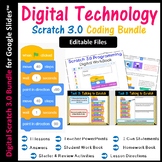
This is the EDITABLE bundle for Scratch 3.0. Resources open in Google Slides so that resources can be shared with students in Google Drive or Google Classroom. This bundle is suitable for Distance Learning.
These lessons are not just step by step tutorials, but cover programming concepts in details such as IF statements, loops etc…. Questions in the worksheet also expect students to look at their created scratch blocks and explain how and why they work as well as how and why they can be modified. (answer key included for questions).
My students have truly enjoyed the lessons in this bundle and have become independent learners of Scratch 3.0.
Who is this bundle suitable for?
- This bundle is suitable for beginner learners of Scratch i.e. those that have not used Scratch before or who have no prior knowledge of coding/programming.
- The resources in this bundle are also suitable for Grades 3 - 10 as long as the learners are new to coding/want to develop their knowledge of Scratch further.
This bundle covers the basics (and much more) of Scratch 3.0 by teaching the below topics:
- Lesson 1: Introduction to Scratch 3.0
- Lesson 2: Animations & Costumes
- Lesson 3: Loops & Motions
- Lesson 4: Coordinates & Sensing
- Lesson 5: Drawing with Sprites
- Lesson 6: Using Variables
- Lesson 7: Changing Backdrops
- Lesson 8: Making Music
- Lesson 9: Scratch Games
- Lesson 10: Animated Stories
- Lesson 11: Scratch Assessment
Each lesson contains the following:
- Detailed lesson directions
- Starter activities
- Review activities
- Work Book
- Homework sheets
- Answer keys for Class sheets and Homework Sheets
- Animated & editable Google Slide presentations to aid teacher delivery
- Pdf versions of lesson PowerPoint presentations
- Scratch Keywords
- I Can Statements for Scratch
Benefits for you:
- Rating this product allows you to collect credits for money off towards your next TPT purchase.
- Follow me for more Technology & Computer Science resources as well as future offers.
Terms of Use:
- Created by Bal Borde, Copyright © Computer Creations
- Purchasing this product grants only the purchaser to a single classroom use license only.
- If you have any questions about licensing, please contact me.
Other Scratch Resources Available on this Store:
- Scratch 3.0 Bundle (Skill Level Beginner): Click Here
- Digital Scratch 3.0 Bundle (Skill Level Beginner): Click Here
- Scratch 3.0 Bundle (Skill Level Advanced Grades 7-10): Click Here
- Scratch 3.0 Ultimate Bundle (Skill Level: Beginner to Advanced): Click Here
- Scratch 1.4 The Entire 1st Bundle: Click Here
- Scratch I Can Statements: Click Here
- Scratch Work Book 1: Click Here
- Scratch Work Book 2: Click Here
- Scratch Booklets Bundle: Click Here
Highlights


Description
This is the EDITABLE bundle for Scratch 3.0. Resources open in Google Slides so that resources can be shared with students in Google Drive or Google Classroom. This bundle is suitable for Distance Learning.
These lessons are not just step by step tutorials, but cover programming concepts in details such as IF statements, loops etc…. Questions in the worksheet also expect students to look at their created scratch blocks and explain how and why they work as well as how and why they can be modified. (answer key included for questions).
My students have truly enjoyed the lessons in this bundle and have become independent learners of Scratch 3.0.
Who is this bundle suitable for?
- This bundle is suitable for beginner learners of Scratch i.e. those that have not used Scratch before or who have no prior knowledge of coding/programming.
- The resources in this bundle are also suitable for Grades 3 - 10 as long as the learners are new to coding/want to develop their knowledge of Scratch further.
This bundle covers the basics (and much more) of Scratch 3.0 by teaching the below topics:
- Lesson 1: Introduction to Scratch 3.0
- Lesson 2: Animations & Costumes
- Lesson 3: Loops & Motions
- Lesson 4: Coordinates & Sensing
- Lesson 5: Drawing with Sprites
- Lesson 6: Using Variables
- Lesson 7: Changing Backdrops
- Lesson 8: Making Music
- Lesson 9: Scratch Games
- Lesson 10: Animated Stories
- Lesson 11: Scratch Assessment
Each lesson contains the following:
- Detailed lesson directions
- Starter activities
- Review activities
- Work Book
- Homework sheets
- Answer keys for Class sheets and Homework Sheets
- Animated & editable Google Slide presentations to aid teacher delivery
- Pdf versions of lesson PowerPoint presentations
- Scratch Keywords
- I Can Statements for Scratch
Benefits for you:
- Rating this product allows you to collect credits for money off towards your next TPT purchase.
- Follow me for more Technology & Computer Science resources as well as future offers.
Terms of Use:
- Created by Bal Borde, Copyright © Computer Creations
- Purchasing this product grants only the purchaser to a single classroom use license only.
- If you have any questions about licensing, please contact me.
Other Scratch Resources Available on this Store:
- Scratch 3.0 Bundle (Skill Level Beginner): Click Here
- Digital Scratch 3.0 Bundle (Skill Level Beginner): Click Here
- Scratch 3.0 Bundle (Skill Level Advanced Grades 7-10): Click Here
- Scratch 3.0 Ultimate Bundle (Skill Level: Beginner to Advanced): Click Here
- Scratch 1.4 The Entire 1st Bundle: Click Here
- Scratch I Can Statements: Click Here
- Scratch Work Book 1: Click Here
- Scratch Work Book 2: Click Here
- Scratch Booklets Bundle: Click Here
Reviews

