
Coding Without Computers
50+ results
Filters
Grade
Subject
Resource type
Standard
Theme
Audience
Language
Programs & methods

Binary Code Review

Formatted to be printed Give the students a break from the computer screen and let them put pen to paper on this wonderful worksheet I created to bring my binary code lecture full circle. Answers are not provided, answers to definitions and fill in the blank sentences could be found on section 2.3 of testout.com in the "TestOut IT Fundamentals Pro English 2.1" Course or you can use definitions from the source of your choosing.
6th - 12th
Arithmetic, Computer Science - Technology

JERC Subtraction Facts Tool

Before purchasing this tool, try the JERC Subtraction Facts Tool 5 Day Free Trial. If you like the trial version, please consider making this purchase.
The JERC Subtraction Facts Tool creates an infinite number of variations of subtraction worksheets with a few mouse clicks. It can also be used as a computer activity that gives instant feedback to students. Skills include subtraction facts to 10, subtraction facts to 20, 2-digit - 1-digit numbers with and without borrowing, 2-digit - 2-digit nu
1st - 4th, Adult Education
Arithmetic, Basic Operations

JERC Addition Facts Tool
Before purchasing this tool, try the JERC Addition Facts Tool 5 Day Free Trial. If you like the trial version, please consider making this purchase.
The JERC Addition Facts Tool creates an infinite number of variations of addition worksheets with a few mouse clicks. It can also be used as a computer activity that gives instant feedback to students. Skills include addition facts to 10, addition facts to 20, 1-digit + 2-digit numbers with and without regrouping, 2-digit + 2-digit numbers with and
1st - 4th, Adult Education
Arithmetic, Basic Operations

Adding Money Pixel Art Math Google Sheets | Editable | 5 Images

Adding money mystery pixel art! Have students practice adding money in dollar + cent notation to AUTO-GENERATE one of 5 pixel art images in Google™ Sheets (or Microsoft Excel™) plus a "secret message." ★ Low Prep: Just assign the sheet in Google Classroom. Each sheet includes all 5 images; students click the tabs at the bottom to advance to the next pixel image. There are 12 math problems per image to solve. ★ Differentiated: Includes 4 levels - choose 1 to assign: Adding Money: Sums Under $
2nd - 3rd
Arithmetic, Computer Science - Technology, Math
CCSS
2.MD.C.8
, 3.NBT.A.2

Christmas 2-Digit Subtraction Without Regrouping Pixel Art | Google Sheets & Exc

Christmas 2-Digit Subtraction Digital Pixel Art is a no-prep, self-checking digital math activity for 2nd grade students. Students solve 2-digit subtraction problems without regrouping, type their answers in the yellow cells, and watch a Christmas mystery picture appear as they answer correctly. This resource works with Excel and Google Sheets, making it easy to assign for math centers, early finishers, independent practice, homework, December review, or sub plans. WHAT'S INCLUDED: • 3 self-chec
2nd
Arithmetic, Basic Operations, Mental Math
CCSS
2.NBT.B.5

2-Digit Subtraction Without Regrouping Pixel Art | Google Sheets & Excel | 2nd G
Make 2-digit subtraction practice more engaging with this self-checking digital pixel art activity for 2nd grade math! Students solve 2-digit subtraction without regrouping problems, type their answers in the yellow answer cells, and receive instant feedback. Correct answers reveal fun year-round mystery pictures: Apple, Star, and Rocket. This digital math resource is perfect for math centers, early finishers, independent practice, homework, sub plans, or year-round review. What’s Included: • Ex
2nd
Arithmetic, Basic Operations, Place Value
CCSS
2.NBT.B.5

Christmas 2-Digit Subtraction Without Regrouping Pixel Art | Google Sheets & Exc
Make 2-digit subtraction practice fun and low-prep this December with this Christmas 2-Digit Subtraction Without Regrouping Pixel Art activity for Google Sheets and Microsoft Excel. Students solve subtraction problems and reveal festive mystery pictures as they type correct answers. This self-checking digital math activity is perfect for 2nd grade math centers, independent practice, early finishers, homework, sub plans, or holiday math review before winter break. What’s Included: • 3 self-checki
2nd - 3rd
Arithmetic, Basic Operations
CCSS
2.NBT.B.5

Intro to Excel: Graphs, Charts & Spreadsheets – Grade 5 STEM Lesson

Excel Spreadsheets Lesson – Computer Science – 5th GradeA complete, ready‑to‑teach introduction to spreadsheets and graphing in ExcelBring spreadsheets to life with this practical, beginner‑friendly lesson designed especially for upper‑elementary learners. Over the course of this unit, students learn how to navigate Excel, understand the key parts of a spreadsheet, and create clear, well‑labelled graphs using real‑world data. This resource includes 17 files, giving you everything you need for a
4th - 7th
Arithmetic, Computer Science - Technology, Math Test Prep

Multiplication Facts Practice, Customizable by Student

This is an Excel file which is intended to be used in classroom where teachers can project the computer screen. It is an excel version of multiplication facts flash cards, with enhancements.
The file generates random multiplication facts. Teachers can set up this workbook to practice facts from 0 to 20, individualizing it for each student. Both the multiplicand and the multiplier are customizable from 0 to 20. The file also shows students' names at random, so that a specific student is called f
3rd - 6th
Arithmetic, Basic Operations, Mental Math

Multiplication Facts Practice: Facts from 0 to 20, and Students' Names
This is an excel file which is intended to be used in classroom where teachers can project the computer screen. It is an excel version of multiplication facts flash cards, with enhancements.
The file generates random multiplication facts. Teachers can set up this file to practice facts from 0 to 20. Both the multiplicand and the multiplier are customizable from 0 to 20. The file also shows students' names at random, so that a specific student is called for a specific question. Teachers may
3rd - 6th
Arithmetic, Basic Operations, Mental Math

Math Worksheet Creator - Division (decimals)
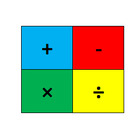
This is a division worksheet that allows the teacher/user to create an unlimited (infinite) number of unique worksheets with the touch of a button (F9). WITH CODED ANSWER KEY!This worksheet allows the teacher/user to select the numbers that are being divided. As a result, this worksheet can be individualized for every type of learner. The teacher/user can also mass print/copy the same worksheet for an entire class or pushout an electronic version for students to complete on their tablets.Whet
K - 5th
Arithmetic, Basic Operations, Math
CCSS
3.NBT.A.3
, 4.NBT.B.5
, 5.NBT.B.5
+1

Math Worksheet Creator - Division (horizontal)
This is a division worksheet that allows the teacher/user to create an unlimited (infinite) number of unique worksheets with the touch of a button (F9). WITH CODED ANSWER KEY!This worksheet allows the teacher/user to select the numbers that are being divided. As a result, this worksheet can be individualized for every type of learner. The teacher/user can also mass print/copy the same worksheet for an entire class or pushout an electronic version for students to complete on their tablets.Whet
K - 5th
Arithmetic, Basic Operations, Math
CCSS
3.NBT.A.3
, 4.NBT.B.5
, 5.NBT.B.5
+1

Math Worksheet Creator - Multiplication (vertical)
This is a multiplication worksheet that allows the teacher/user to create an unlimited (infinite) number of unique worksheets with the touch of a button (F9). WITH CODED ANSWER KEY!This worksheet allows the teacher/user to select the numbers that are being multiplied. As a result, this worksheet can be individualized for every type of learner. The teacher/user can also mass print/copy the same worksheet for an entire class or pushout an electronic version for students to complete on their tab
K - 5th
Arithmetic, Basic Operations, Math
CCSS
3.NBT.A.3
, 4.NBT.B.5
, 5.NBT.B.5
+1

Math Worksheet Creator - Division (vertical)
This is a division worksheet that allows the teacher/user to create an unlimited (infinite) number of unique worksheets with the touch of a button (F9). WITH CODED ANSWER KEY!This worksheet allows the teacher/user to select the numbers that are being divided. As a result, this worksheet can be individualized for every type of learner. The teacher/user can also mass print/copy the same worksheet for an entire class or pushout an electronic version for students to complete on their tablets.Whet
K - 5th
Arithmetic, Basic Operations, Math
CCSS
3.NBT.A.3
, 4.NBT.B.5
, 5.NBT.B.5
+1

Math Worksheet Creator - Multiplication (decimals)
This is a multiplication worksheet that allows the teacher/user to create an unlimited (infinite) number of unique worksheets with the touch of a button (F9). WITH CODED ANSWER KEY!This worksheet allows the teacher/user to select the numbers that are being multiplied. As a result, this worksheet can be individualized for every type of learner. The teacher/user can also mass print/copy the same worksheet for an entire class or pushout an electronic version for students to complete on their tab
K - 5th
Arithmetic, Basic Operations, Math
CCSS
3.NBT.A.3
, 4.NBT.B.5
, 5.NBT.B.5
+1

Math Worksheet Creator - Multiplication (horizontal)
This is a multiplication worksheet that allows the teacher/user to create an unlimited (infinite) number of unique worksheets with the touch of a button (F9). WITH CODED ANSWER KEY!This worksheet allows the teacher/user to select the numbers that are being multiplied. As a result, this worksheet can be individualized for every type of learner. The teacher/user can also mass print/copy the same worksheet for an entire class or pushout an electronic version for students to complete on their tab
K - 5th
Arithmetic, Basic Operations, Math
CCSS
3.NBT.A.3
, 4.NBT.B.5
, 5.NBT.B.5
+1

Math Worksheet Creator - Subtraction (vertical)
This is a subtraction worksheet that allows the teacher/user to create an unlimited (infinite) number of unique worksheets with the touch of a button (F9). WITH CODED ANSWER KEY!This worksheet allows the teacher/user to control the difficulty of the problem by choosing the problem's parameters. As a result, this worksheet can be individualized for every type of learner. The teacher/user can also mass print/copy the same worksheet for an entire class or push out an electronic version to studen
K - 5th
Arithmetic, Basic Operations, Math
CCSS
1.NBT.C.4
, 2.NBT.B.5
, 2.NBT.B.6
+3

Math Worksheet Creator - Subtraction (horizontal)
This is a subtraction worksheet that allows the teacher/user to create an unlimited (infinite) number of unique worksheets with the touch of a button (F9). WITH CODED ANSWER KEY!This worksheet allows the teacher/user to control the difficulty of the problem by choosing the problem's parameters. As a result, this worksheet can be individualized for every type of learner. The teacher/user can also mass print/copy the same worksheet for an entire class or push out an electronic version to studen
K - 5th
Arithmetic, Basic Operations, Math
CCSS
1.NBT.C.4
, 2.NBT.B.5
, 2.NBT.B.6
+3

Math Worksheet Creator - Addition (vertical)
This is an addition worksheet that allows the teacher/user to create an unlimited (infinite) number of unique worksheets with the touch of a button (F9). WITH CODED ANSWER KEY!This worksheet allows the teacher/user to select the numbers that are being added. As a result, this worksheet can be individualized for every type of learner. The teacher/user can also mass print/copy the same worksheet for an entire class or push out an electronic version for students to complete on their tablets.Whet
K - 5th
Arithmetic, Basic Operations, Math
CCSS
1.NBT.C.4
, 2.NBT.B.5
, 2.NBT.B.6
+3

Math Worksheet Creator - Addition (horizontal)
This is an addition worksheet that allows the teacher/user to create an unlimited (infinite) number of unique worksheets with the touch of a button (F9). WITH CODED ANSWER KEY!This worksheet allows the teacher/user to select the numbers that are being added. As a result, this worksheet can be individualized for every type of learner. The teacher/user can also mass print/copy the same worksheet for an entire class or pushout an electronic version for students to complete on their tablets.Wheth
K - 5th
Arithmetic, Basic Operations, Math
CCSS
1.NBT.C.4
, 2.NBT.B.5
, 2.NBT.B.6
+3

Math Dice Game Addition (Compatible with Microsoft Excel Macros)

I am excited to offer you a fun, easy-to-use, virtual math addition dice game! This game is compatible with Microsoft Excel. This game... + can be played without physical dice + allows addition using 1-6 dice + includes a correct answer counter that accumulates once students input the correct answers. + looks fun including many animations Simply:A. Enter Number of Dice B. Click "Roll Dice" button C. Add the numbers and input the answer D. Click "Check Answer" button to see if you are correct!
PreK - 5th
Arithmetic, Math, Mental Math

Math Dice Game Multiplication (Compatible with Microsoft Excel Macros)
I am excited to offer you a fun, easy-to-use, virtual math multiplication dice game! This game is compatible with Microsoft Excel. This game... + can be played without physical dice + allows multiplication using 2-6 dice + includes a correct answer counter that accumulates once students input the correct answers + looks fun including many animations Simply:A. Enter Number of Dice B. Click "Roll Dice" button C. Multiply the numbers and input the answer D. Click "Check Answer" button to see if you
PreK - 6th
Arithmetic, Math, Mental Math

Math Dice Game Addition & Multiplication (Compatible with Microsoft Excel Macro)
I am excited to offer you a fun, easy-to-use, virtual math addition and multiplication dice game! This game is compatible with Microsoft Excel. This game... + can be played without physical dice + allows addition using 1-6 dice + allows multiplication using 2-6 dice + includes a correct answer counter that accumulates once students input the correct answers + looks fun including many animations Simply:A. Enter Number of Dice B. Click "Roll Dice" button C. Add or multiply the numbers and inp
PreK - 7th
Arithmetic, Math, Mental Math

2nd Grade Addition & Subtraction Mixed Review Pixel Art | Google Sheets & Excel
Make addition and subtraction mixed review more engaging with this self-checking digital pixel art activity for 2nd grade math! This no-prep resource includes 3 year-round school-themed activities for practicing addition and subtraction without regrouping. Students solve each problem, type their answer in the yellow answer cell, and receive instant feedback. Correct answers reveal part of the mystery picture automatically. This resource works in both Google Sheets and Excel. What’s included: • T
2nd
Arithmetic, Basic Operations
CCSS
2.NBT.B.5
Showing 1-24 of 50+ results

TPT is the largest marketplace for PreK-12 resources, powered by a community of educators.
IXL family of brands